Foundations of IT Support: Starting From the Ground Up
When I started building RiseWithTech, I knew I didn’t want it to just be theory. I wanted it to be hands-on — something I’d actually do and share along the way. So here’s my first assignment from Course 1: Foundations of IT Support.
This is where every IT Support Specialist begins: learning the basics, getting familiar with your own system, and practicing how to communicate solutions clearly.
What IT Support Specialists Do
I learned that IT Support Specialists are the first line of defense when something goes wrong with technology. Depending on the level, the role can look like this:
- Help Desk / Level 1 (L1): Handle common issues like password resets, internet not working, or software questions.
- Desktop Support / Level 2 (L2): Dive deeper into troubleshooting, handling device repairs, OS problems, or escalated tickets.
- Level 3 (L3): Advanced technical specialists or system admins who solve the most complex issues.
What stood out to me is how communication is just as important as technical skill. IT support isn’t only about fixing computers — it’s about helping people feel calm, understood, and back on track quickly.
Looking at My Own System
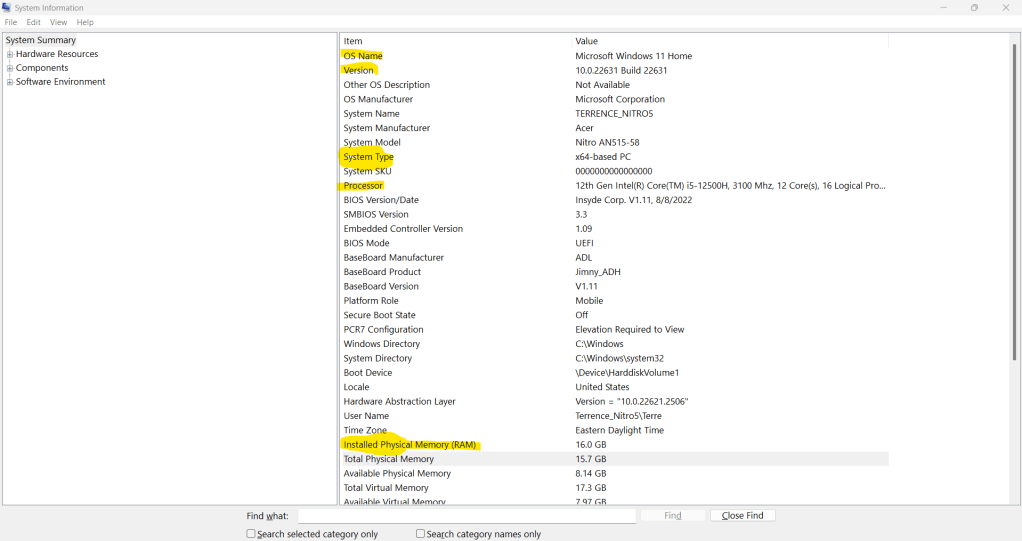
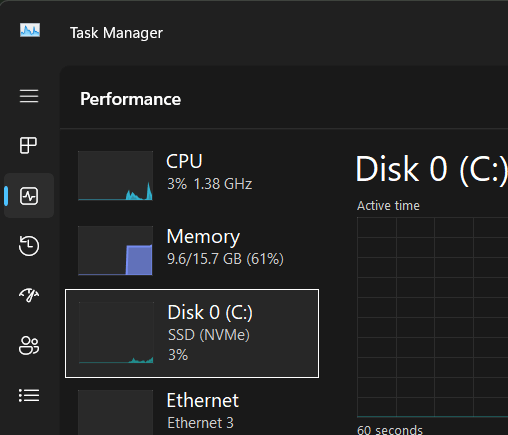
As part of the task, I checked my own computer’s specs and took a screenshot of the key details:
- RAM
- Operating System version
- Storage type (HDD/SSD)
Here’s what I learned about why each spec matters for troubleshooting:
- RAM: This determines how many applications your system can run smoothly at once. Low RAM can cause freezing or lag, which is a common support issue.
- Operating System version: Knowing the OS version helps identify compatibility issues with software or security patches. A missing update can often be the root cause of a problem.
- Storage type: HDDs are slower, SSDs are faster — and failing drives can cause major system crashes. Knowing the type helps IT support narrow down performance or boot issues.
Explaining a Fix in Plain English
One of the biggest challenges in IT is translating technical fixes into plain language. So I practiced this by explaining a simple Wi-Fi troubleshooting step to a friend:
Tech version: “Try flushing the DNS cache to reset the resolver.”
Plain-English version: “Sometimes your computer stores old internet directions that no longer work. Clearing them out gives your device a fresh start to find the right path online.”
That exercise reminded me: it’s not enough to know what to do — you have to explain it in a way that someone else can trust and follow.
Deliverable: My Knowledge Base Entry
I created my first entry in my “IT Support Knowledge Base,” which I’ll keep updating throughout this course. Here’s the Foundations entry:
Problem: Understanding my system’s specs.
Steps Taken: Opened system info, took a screenshot, reviewed RAM, OS, and storage type.
Result: Clearer picture of how my computer’s performance ties into real-world troubleshooting.
Reflection: IT support starts with the basics — knowing your machine, explaining things simply, and remembering that patience is part of the job.
Closing Thought
This first step reminded me that IT support is equal parts technical awareness and human connection. You can’t fix a problem you don’t understand, and you can’t help someone if you can’t meet them where they are.
That’s the foundation I’m building here — one assignment at a time.
 RiseWithTech
Leave a comment