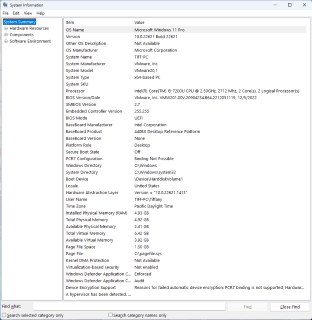
Understanding the System Information Window
The System Information window (opened by typing msinfo32) gives you a detailed snapshot of your computer’s hardware and software.
It’s like your system’s “report card” — everything about your machine is listed in one place.
Here’s what it shows:
- OS Name and Version: Which edition of Windows you’re running.
- System Manufacturer and Model: Your device’s brand and model number.
- Processor: The type and speed of your CPU.
- Installed Physical Memory (RAM): How much total memory your computer has.
- System Type: Whether your system is 32-bit or 64-bit.
Why it matters:
IT Support Specialists use this tool to quickly identify a system’s specs without opening any hardware. It’s a reliable, built-in way to gather essential information before diagnosing or upgrading a computer.
 RiseWithTech
Leave a comment